VU950 Manual
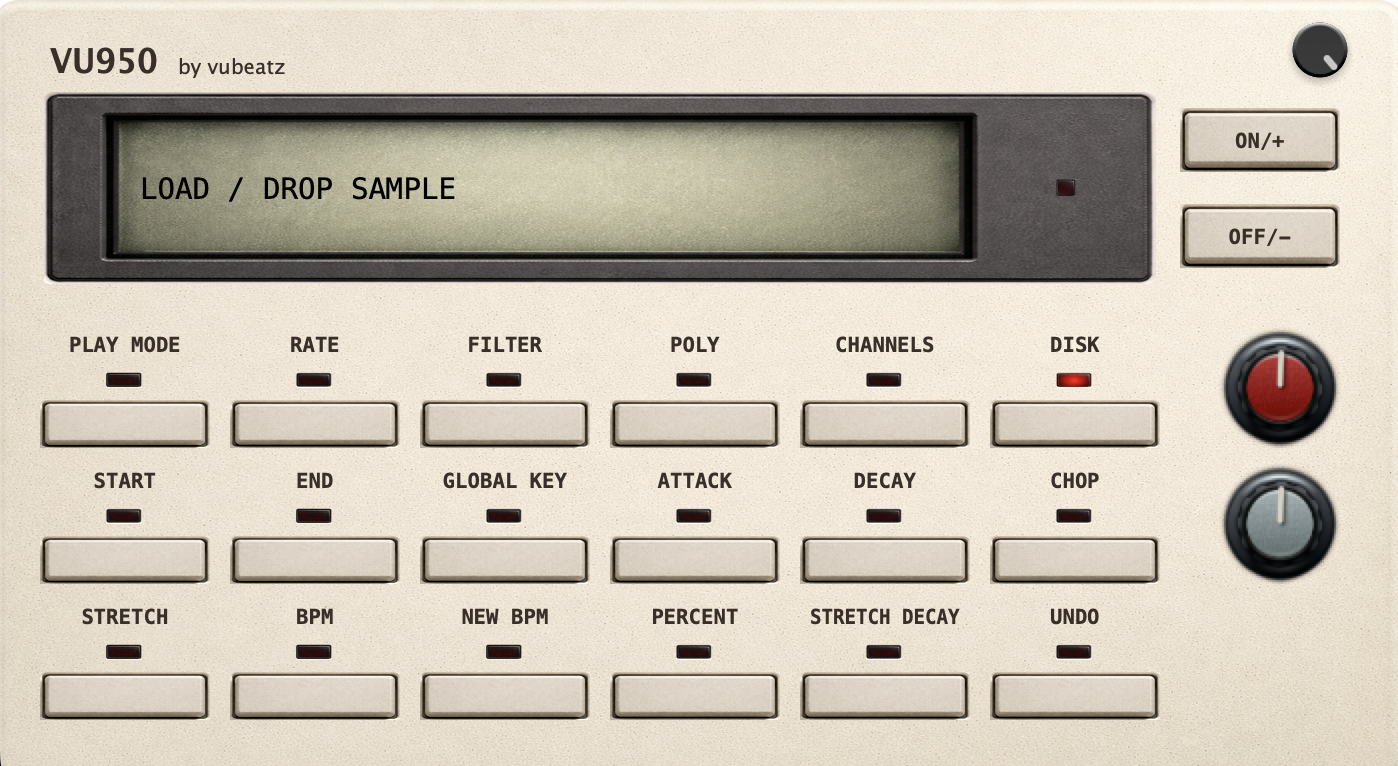
VU950 is a character-driven digital sampler inspired by early hardware samplers. It keeps the full VU900 workflow and adds 48 kHz support, a built-in audio file browser and full timestretch functionality with classic hardware sampler tone.
Installation
Plugin Formats
VU950 is available as a VST3 plugin on Windows and macOS, and as an Audio Unit (AU) plugin on macOS. Both formats provide identical sound and functionality.
Installing the Plugin
VU950 is distributed as a ZIP archive and does not require a dedicated installer. After downloading, extract the archive and place the plugin file in the appropriate folder.
Windows (VST3):
C:\Program Files\Common Files\VST3
macOS (VST3):
/Library/Audio/Plug-Ins/VST3
~/Library/Audio/Plug-Ins/VST3
macOS (AU):
/Library/Audio/Plug-Ins/Components
~/Library/Audio/Plug-Ins/Components
Plugin Scanning
After installation, restart your DAW or trigger a manual plugin rescan if the plugin does not appear.
Instrument Plugin
VU950 is a sampler instrument, not an effect. It will appear in the instrument browser of your DAW.
“Plugin is damaged” on macOS
If macOS reports that the plugin is damaged and can’t be opened, the issue is usually related to security quarantine flags.
VST3:
xattr -dr com.apple.quarantine /Library/Audio/Plug-Ins/VST3/VU950.vst3
AU:
xattr -dr com.apple.quarantine /Library/Audio/Plug-Ins/Components/VU950.component
Updates
Updates within the same major version are free. Major upgrades may be paid.
If you already bought VU900, you get VU950 for free. Visit the Downloads page to get your update files.
Screens & Workflow
Start Screen
The Start screen is used to define the playback start point of the sample. Holding SHIFT enables fine adjustment for precise trimming.
End Screen
The End screen defines where playback stops. As on the Start screen, holding SHIFT allows micro-adjustments for accurate cuts.
Truncate
Truncate permanently removes audio data outside the defined Start and End points. This operation commits the edit and reflects the intended hardware-style workflow. Truncate is only available when CHOP mode is disabled.
Disk Screen
Load audio by pressing DISK and using the built-in browser to preview and select audio files. Drag and drop still works for fast loading. The sampler supports mono playback and a maximum sample length of 63 seconds.
Sample Rate
Controls internal sample rate reduction, ranging from approximately 48 kHz down to around 7.5 kHz for classic digital artifacts and texture. Screen values are as bandwidth like on Akai S900.
Filter
Musical low-pass filter used to shape the high-frequency content after sample rate reduction.
Chop Mode
Chop Mode divides the loaded sample into 16 slices, mapped chromatically from C1 to D#2 as note on and C3 to D#4 as one shots, enabling fast drum programming and rhythmic performance.
Polyphony
VU950 operates in either mono or 8-voice polyphonic mode, depending on the selected configuration.
Play mode
Note on mode triggers samples when keys are pressed, while One Shot mode plays the entire sample regardless of key release.
Channels
VU950 supports mono samples. Stereo samples are not summed to mono upon loading. User can pick left or right channel for playback.
Timestretch
Timestretch is fully integrated into the VU950 workflow. You can extend or tighten sample timing while preserving the classic character of hardware samplers, making it easier to lock loops and phrases to tempo without losing texture.
STRETCH selects one of five stretch presets. Each preset gives a different balance of grain, transient response and tone.
BPM is the detected tempo of your source sample. Detection is automatic, but not always perfect, so you can set it manually for better timing accuracy.
NEW BPM sets the target tempo for the stretched sample.
PERCENT sets the target sample length in percent. Values below 100% make the sample faster and shorter. Values above 100% make it slower and longer.
STRETCH DECAY controls how the stretched tail is shaped after processing. Lower values keep the result tighter and more aggressive, while higher values smooth and extend the tail for a softer, more blended stretch character.
UNDO restores the original sample and reverses all timestretch processing.
Attack
Controls the time it takes for the volume to reach its maximum level after a note is triggered. Works in CHOP MODE as well.
Decay
Controls the time it takes for the volume to decrease to zero after the note is released. Works in CHOP MODE as well.
Input Drive
Input Drive controls the level and character of the signal before it enters the internal sampling and processing stage. Increasing Input Drive adds saturation and subtle nonlinearities inspired by early digital samplers, affecting how transients and harmonics are captured.
Anti-Aliasing Filter
The Anti-Aliasing Filter controls the amount of high-frequency filtering applied before and during sample rate reduction. Higher values result in a cleaner, smoother sound with reduced aliasing, while lower values allow more high-frequency content to fold back, producing aggressive digital artifacts characteristic of early sampler hardware.
Output Gain
Output Gain adjusts the final level after all internal processing stages. It is designed for level matching and gain staging, allowing you to balance the processed signal with other tracks in your DAW without altering the internal character created by Input Drive and sample processing.
MIDI Playback
Pitch directly affects playback speed, preserving the behavior of classic digital samplers.
Demo Limitations
The demo version does not allow saving or recalling plugin state.
← Back to VU950